Soft Shader transforms your Minecraft experience with subtle yet immersive visual enhancements—all without requiring Optifine. This lightweight shader pack utilizes Minecraft’s Core Shader system to introduce realistic and charming effects….
Owners of powerful computers can significantly improve the look of Minecraft. For example, you can install the KUDA Shaders, which makes the graphics more realistic and exciting. These shaders very…
Shaders MrMeep Shaders is a real find for owners of weak computers. They add high-quality smoothing, realistic lighting and water and at the same time almost do not reduce FPS….
Realistic
Beautiful
SEUS Ultra Shaders
0
0
0
SEUS Ultra shaders alter Minecraft graphics beyond recognition. All components are perfectly worked out in them. Now the game will look great regardless of lighting and in all weather conditions…
Weak PC
Beautiful
Youtuber’ Dream Shaders
0
0
2
Youtuber’ Dream shaders were created to improve the quality of youtubers’ videos. They do not add unnecessary effects, but just noticeably improve the graphics. Shaders features high-quality shadows, pleasant soft…
Beautiful
Weak PC
Sunflawer Shaders
0
0
2
Well-known BSL shaders were used to create Sunflawer. Author worked hard on optimization, which allows you to use them even on weak PCs. In this case, you will get very…
Beautiful
Cartoon Shaders
0
0
0
Cartoon Shaders shaders make Minecraft graphics look more cartoony. However, it has several other important features. Unlike most other shaders, Cartoon Shaders almost does not change the light and reflection…
The Wave shader was created for fans of unusual sensations. It is unlikely to be suitable for regular play in Minecraft, as it forces the entire map to rise and…
Beautiful
Plunder Pixels Shaders
0
0
0
The Plunder Pixels shader is suitable for anyone who wants to significantly improve the graphics in Minecraft without losing FPS. Almost all the elements were reworked , so the game…
Beautiful
Unusual
Arcane Shaders
0
0
0
Arcane shaders were created to make Minecraft more atmospheric. They are perfect for use with various RPG textures (the author recommends using the Conquest pack), and will also be a…
Realistic
Beautiful
Raspberry Shaders
0
0
5
The main feature of Raspberry shaders is the ability to configure as flexibly as possible. With them, you can make the graphics in Minecraft exactly the way you always wanted…
Weak PC
yShaders
0
0
1
How to install yShaders Make sure you have Optifine installed and working correctly. If you are playing with the Fabric loader, then use Iris Shaders. Download the shaders and leave it…
How to choose and install Minecraft shaders
A shader pack replaces the way Minecraft Java Edition draws light. Blocks and mobs stay the same, but the sun casts real shadows, water reflects the sky and fog fills valleys at dawn. Every pack on this page is a zip file that runs through one of two loaders, and picking the right pack depends mostly on your graphics card. Below is how to get from download to working shaders without the usual black screen.
OptiFine or Iris: choose the loader first
Shader packs do nothing on their own. You need either OptiFine or Iris, and both read the same OptiFine-format packs.
OptiFine by sp614x is a single installer that also adds zoom, connected textures, custom item textures and many video settings. It runs on plain Minecraft or as a Forge mod. It cannot be combined with Sodium.
Iris is a shaders-only mod for Fabric, Quilt and NeoForge that runs on top of Sodium. The Iris team says popular packs like BSL and Complementary run with much better performance than they did on OptiFine.
If you do not need OptiFine's extra features, Iris is usually the faster route. If you play a Forge modpack that already includes OptiFine, stay with it.
Iris Shaders loads the same packs as OptiFine and pairs with Sodium for speed.
Which shader pack for which PC
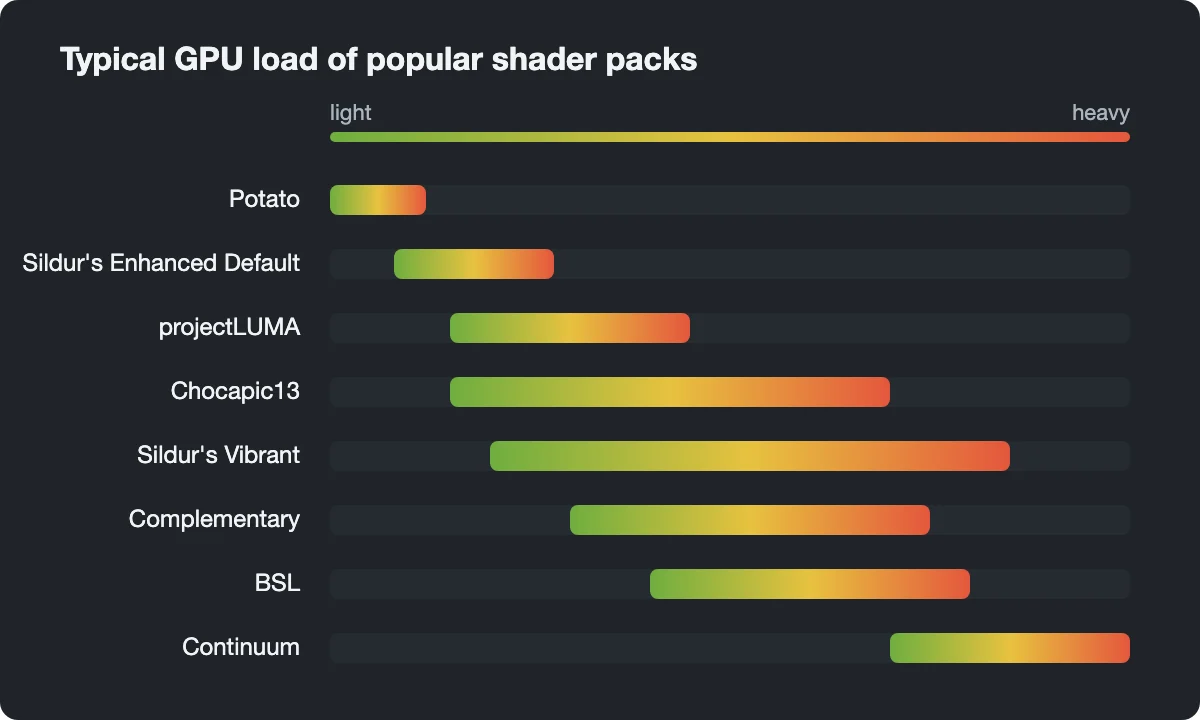
The chart below ranks the packs we host by typical GPU load. It is a qualitative guide, not a benchmark: your result depends on resolution, render distance and the preset you choose inside each pack.
Use the bars to shortlist two or three packs, then try them on your own PC.
Integrated graphics or an old laptop:Potato skips dynamic shadows altogether; Sildur's Enhanced Default adds shadows but keeps the vanilla look.
Entry-level dedicated card:projectLUMA for a realistic sky and water, or the lower versions of Chocapic13.
High-end card:Continuum and SEUS for screenshots more than for long survival sessions.
At the light end, Potato Shaders improve color and water without any shadow cost.Mid-range packs like Complementary Shaders also rework the Nether, not only the Overworld.
What the effect names mean
Shader settings menus are full of jargon. These are the terms worth knowing, roughly in order of cost:
Shadows are real shadows cast from the sun or moon. Shadow resolution and shadow distance are the two sliders that cost the most frames.
Volumetric light (also god rays or light shafts) makes beams of light visible in the air, through leaves or a window.
Reflections on water and glass are usually screen-space: they can only show what is already on screen, so they fade at the edges.
PBR (physically based rendering) gives blocks their own roughness, shine and bumps. It needs a resource pack that ships normal and specular maps; with default textures it does nothing.
TAA is temporal anti-aliasing. It smooths jagged edges by blending frames, at the price of slight softness.
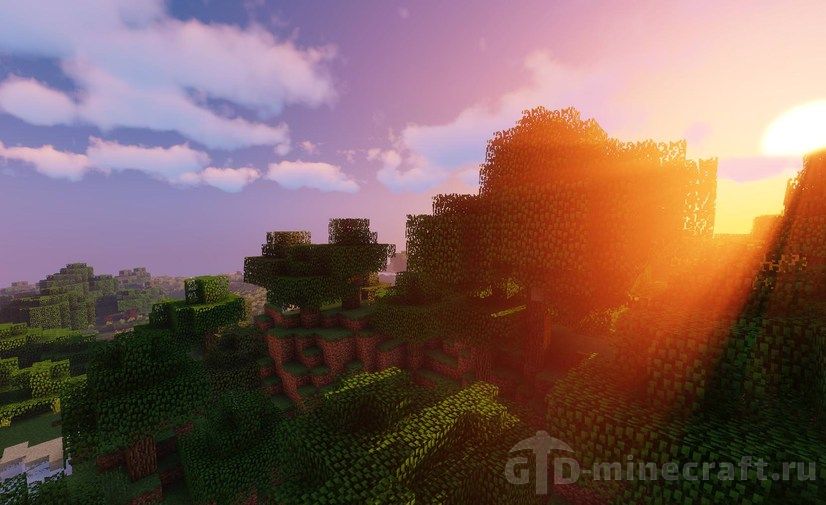
Volumetric light at sunset in Sildur's Vibrant, the effect most people picture when they hear the word shaders.
Installing a pack
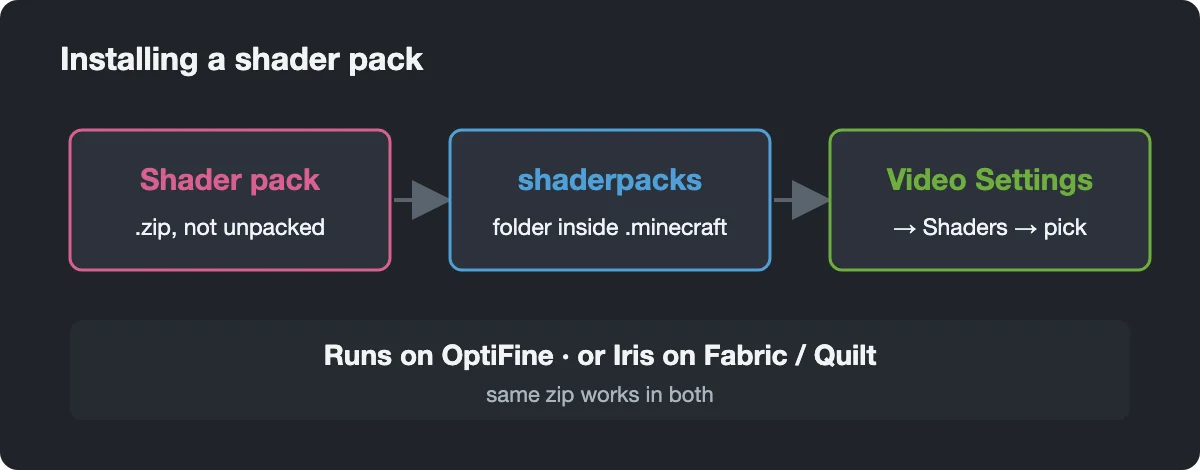
The procedure is the same for every pack here:
Install OptiFine for your exact Minecraft version, or install Iris with Sodium (the Iris installer can do both).
Download the shader zip and leave it packed.
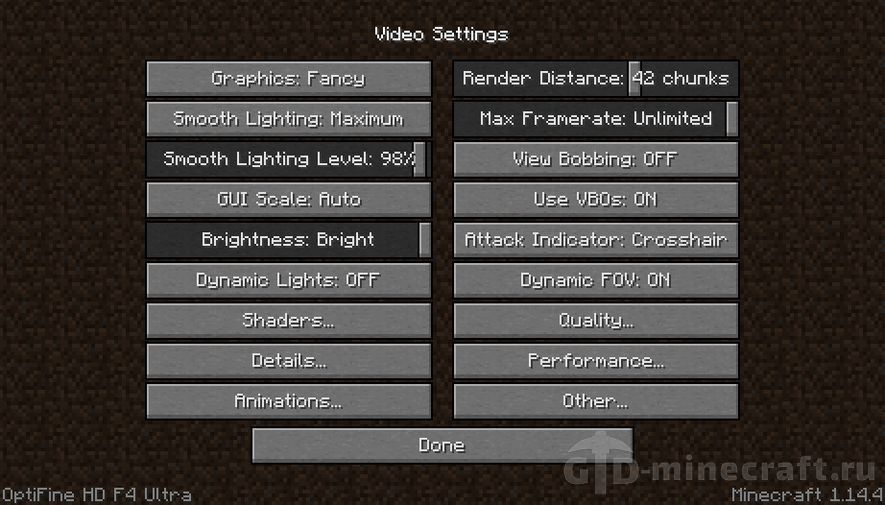
In game open Options, Video Settings, then Shaders (OptiFine) or Shader Packs (Iris).
Click Shaders Folder or Open Shader Pack Folder and drop the zip into the shaderpacks folder.
Select the pack in the list. Its own settings open from Shader Options in OptiFine or Shader Pack Settings in Iris.
One zip, one folder, one menu: the steps do not change from pack to pack.
When something goes wrong
The pack does not appear in the list. You probably unpacked it, or the download contains several zips inside one archive (Chocapic13 V9 works that way). The shaderpacks folder needs the pack zip itself.
Black screen or a broken image. Update your graphics driver first. On laptops, make sure Java runs on the dedicated GPU and not the integrated one. Never install OptiFine and Sodium together. With Iris, pressing K turns shaders off so you can get back to the menu.
Low FPS. Switch to a lighter preset inside the pack, lower shadow resolution and render distance, or move to a lighter pack from the chart. Our guide on how to boost FPS in Minecraft covers the game settings too.
Wrong version. OptiFine must match your Minecraft version exactly, and its installer is a jar that needs Java to run. Some packs also have limits on the loader: Iris lists Continuum 2.1 and RT as not supported, so those need OptiFine. Finally, all of these are Java Edition packs; Bedrock and Minecraft PE cannot load them.
The Shaders button in OptiFine Video Settings is the first place to check when a pack will not load.