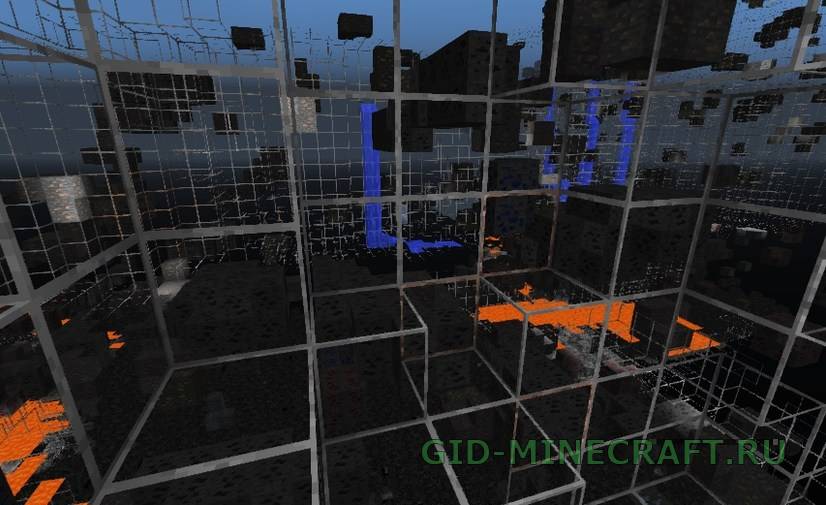
XRay Ultimate texture pack will simplify the search for resources in Minecraft. It makes all textures transparent except valuable ores and spawners. Thus, you will always know in which direction…
BeastX Xray Texture Pack [16×16]
0
0
1
Version:
1.18.2 /
1.18.1 /
1.18 /
1.17.1 /
1.17 /
1.16.5 /
1.16.4
BeastX Xray is another cheat texture pack with an interesting feature. It does not affect form blocks of sod, earth and sand, so Minecraft on the surface will look absolutely…
XRay texture packs for Minecraft: how they work and which one to take
An XRay texture pack is a resource pack in which stone, dirt, gravel, sand, netherrack and the other filler blocks are drawn with a transparent texture. The game still treats them as solid, you still have to dig through them, but you see straight through the ground: ore, caves, mineshafts, strongholds, dungeons and other players’ bases. No mod loader is involved, the pack goes into the resourcepacks folder like any other.
Two packs cover every version from 1.6 to 1.20.6. XRay Ultimate is the full-strength one: everything that is not ore, a chest, a spawner or lava disappears, and there is a separate build for each major version because the block IDs and the pack format changed along the way. BeastX Xray is the quieter option for 1.14–1.18: the surface stays normal, blocks become transparent only underground, and each transparent block keeps a thin frame so you can walk a cave without hitting invisible walls.
Pick your version
Each page has the right build, the install steps for that version and the answers that come up most often.
The pack is always on and works with any loader, including a plain vanilla client and Eaglercraft. The XRay mod has a hotkey, a configurable block list and a render distance setting, but it needs Forge or Fabric. If you only want to find diamonds and ancient debris once in a while, the mod is more comfortable; if you play old versions or a browser client, the pack is the only route.
Installing
On 1.12 and older, install Optifine first; the old packs were drawn for it and show black faces without it. On 1.13+ Optifine is optional.
Download the zip for your version and keep it zipped.
Options → Resource Packs → Open Pack Folder, drop the zip in.
Move the pack to the right column and click Done. The reload takes a few seconds and the ground is transparent, no restart needed.
Questions
Is XRay allowed?
In singleplayer and on your own server, yes. On public servers it counts as cheating almost everywhere; anti-xray plugins hide ore until you dig next to it and ban accounts whose tunnels lead straight to diamonds. Switch the pack off before joining.
Does it work on Bedrock or Pocket Edition?
No. These packs are for Java Edition. Bedrock uses a different pack format and a different renderer.
Why does the ground look black?
Missing Optifine on an old version, or smooth lighting at maximum on a new one. Install Optifine for 1.12 and older; on 1.13+ lower smooth lighting in the video settings.
Which pack shows ancient debris?
XRay Ultimate from the 1.16 build onward. Netherrack, basalt and blackstone go transparent, the debris and nether gold stay visible.
Does the pack change the world file?
No. It changes textures only. Remove it and the world is exactly as before.