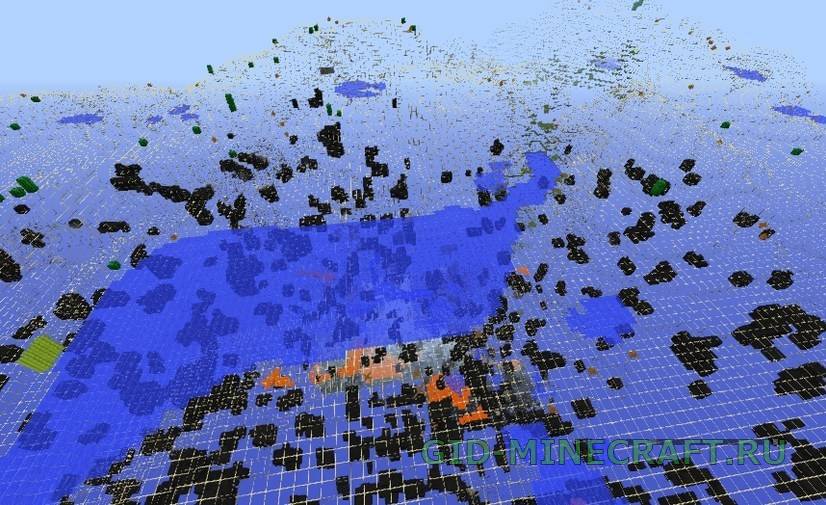
XRay Ultimate texture pack will simplify the search for resources in Minecraft. It makes all textures transparent except valuable ores and spawners. Thus, you will always know in which direction…
XRay for Minecraft 1.12.1: what it shows and which file to take
Minecraft 1.12.1 (August 2017) is the first World of Color patch. This is the Forge generation, and XRay here comes in two flavours. The texture pack route is XRay Ultimate, version 2.2.1 for 1.12: stone and the filler blocks go transparent, ore stays painted, and you read the ground like a map. The mod route gives you a hotkey instead, so the world looks normal until you press X.
Ore generation on 1.12.1 is the classic layout: coal and iron almost everywhere below Y 64, gold under Y 32, redstone and lapis in the twenties, diamonds under Y 16. With the pack on, the diamond layer reads as a thin band of blue dots a dozen blocks above bedrock, and emeralds show only inside extreme hills.
Options for 1.12.1
XRay Ultimate — the texture pack, version 2.2.1 for 1.12. Transparent stone, visible ore, no mod loader needed.
XRay Mod for Forge — a hotkey mod: press X, the world goes transparent, press again and it is back. Lets you choose which ores to highlight.
Installing XRay on 1.12.1
Install Optifine for 1.12.1 first. The old packs were drawn for it; on a plain client some ore faces stay black because the game stops drawing hidden sides of blocks.
Download the zip and leave it zipped.
Open Options → Resource Packs → Open Pack Folder and drop the zip there.
Move the pack to the right column, click Done and wait for the reload. The ground turns transparent at once, no new world needed.
Questions people ask about XRay 1.12.1
Is it a cheat?
On your own world it is a tool, on someone else’s server it is a cheat. Nearly every public server on 1.12.1 runs an anti-xray plugin that either hides ore until you dig next to it or logs the mining pattern and bans later. Use it for exploring your maps, for finding a lost base or a stronghold, and turn it off before joining a server.
Why is the ground black instead of transparent?
Because Optifine is missing. Without it the client does not draw the faces of blocks that are touching other solid blocks, so you see a black void with a few lit ores. Install Optifine for 1.12.1, restart, and the pack starts working.
Where are the diamonds on 1.12.1?
Between bedrock and Y 16, most often around Y 11–12. With the pack on, stand at Y 12 and look sideways: the blue dots within forty blocks are the ones to dig toward.
Can the pack ruin a save?
No. A resource pack changes only what is drawn, not the world file. Remove it from the right column and the world looks normal again.