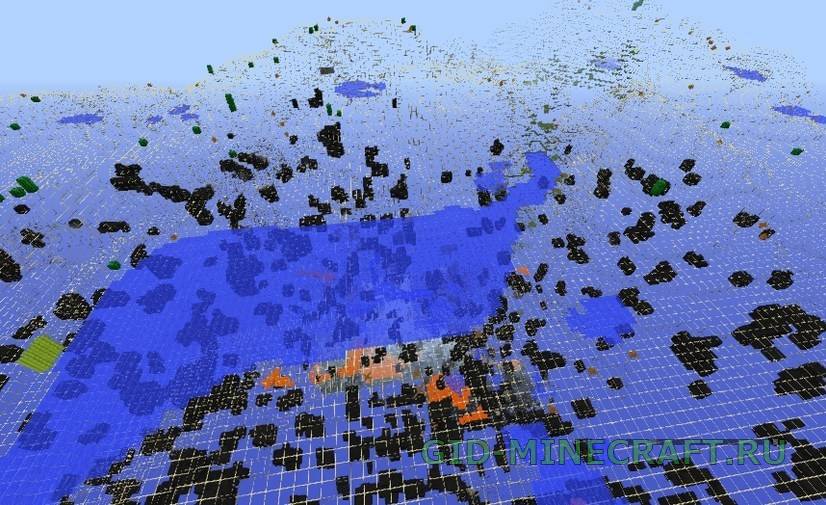
XRay Ultimate texture pack will simplify the search for resources in Minecraft. It makes all textures transparent except valuable ores and spawners. Thus, you will always know in which direction…
BeastX Xray Texture Pack [16×16]
0
0
1
BeastX Xray is another cheat texture pack with an interesting feature. It does not affect form blocks of sod, earth and sand, so Minecraft on the surface will look absolutely…
XRay for Minecraft 1.16.3: what it shows and which file to take
Minecraft 1.16.3 (September 2020) is a bugfix patch of the Nether era. The Nether Update is where XRay packs got a second job: ancient debris. It generates in tiny veins between Y 8 and Y 22 inside netherrack, and it is the one ore people genuinely cannot find without digging in patterns. XRay Ultimate version 3.4.0 for 1.16 makes netherrack, basalt and blackstone transparent and leaves ancient debris and nether gold ore visible from the lava lakes.
The Overworld half works like before: stone, deepslate-free in this version, goes clear and the familiar ore layers show through, diamonds under Y 16, lapis and redstone around Y 15–25. BeastX Xray covers 1.16.3 too and is the gentler option: nothing changes until you go below ground.
Options for 1.16.3
XRay Ultimate — the texture pack, version 3.4.0 for 1.16. Transparent stone, visible ore, no mod loader needed.
BeastX Xray — a texture pack that leaves the surface alone and outlines every transparent block with a frame.
XRay Mod for Forge — a hotkey mod: press X, the world goes transparent, press again and it is back. Lets you choose which ores to highlight.
XRay Mod for Fabric — the same idea for Fabric and Quilt, with the X key and a configurable ore list.
Installing XRay on 1.16.3
Optifine is optional on 1.16.3, but it makes the transparent blocks render without dark faces. Sodium users can skip it.
Download the zip and leave it zipped.
Open Options → Resource Packs → Open Pack Folder and drop the zip there.
Move the pack to the right column, click Done and wait for the reload. The ground turns transparent at once, no new world needed.
Questions people ask about XRay 1.16.3
Is it a cheat?
On your own world it is a tool, on someone else’s server it is a cheat. Nearly every public server on 1.16.3 runs an anti-xray plugin that either hides ore until you dig next to it or logs the mining pattern and bans later. Use it for exploring your maps, for finding a lost base or a stronghold, and turn it off before joining a server.
Does it work with Sodium or Iris?
Yes. The pack is plain textures, it does not need Optifine on 1.16.3. Some faces may look darker with Sodium because of smooth lighting; turning smooth lighting to minimum fixes it.
Does it show ancient debris?
It does. Go to the Nether, stand at Y 15 and look around: debris shows as dark brown blocks hanging inside transparent netherrack, usually in veins of one to three. Lava is drawn normally, so you still see where not to step.
Can the pack ruin a save?
No. A resource pack changes only what is drawn, not the world file. Remove it from the right column and the world looks normal again.