
Stutter when you fly over new terrain, frame drops when you turn toward a big build, a fan that never stops: most of that comes from how vanilla Minecraft draws chunks. Sodium replaces that rendering engine with its own. It is made by JellySquid and the CaffeineMC team, it runs on the client only, and it leaves the look of the game alone. No new art style, no changed blocks, just the same world drawn with far less work for your CPU and graphics card.
This page carries the original Fabric builds, which also load on Quilt. Since version 0.6.0, CaffeineMC publishes NeoForge builds as well; those sit on our separate Sodium for Forge and NeoForge page, together with an explanation of what does and doesn’t work on classic Forge.
What you notice after installing
Higher frame rates and less micro-stutter are the point, especially while new chunks stream in as you travel. How much you gain depends entirely on your hardware, your render distance and what else is installed. The honest way to measure is the F3 screen: note the FPS in one spot before and after, with the same settings.
Because Sodium is purely client-side, you can join any server with it, vanilla ones included. The server never knows it is there, and installing it on a dedicated server does nothing. The CaffeineMC description also mentions fixes for a number of vanilla graphical glitches along the way.
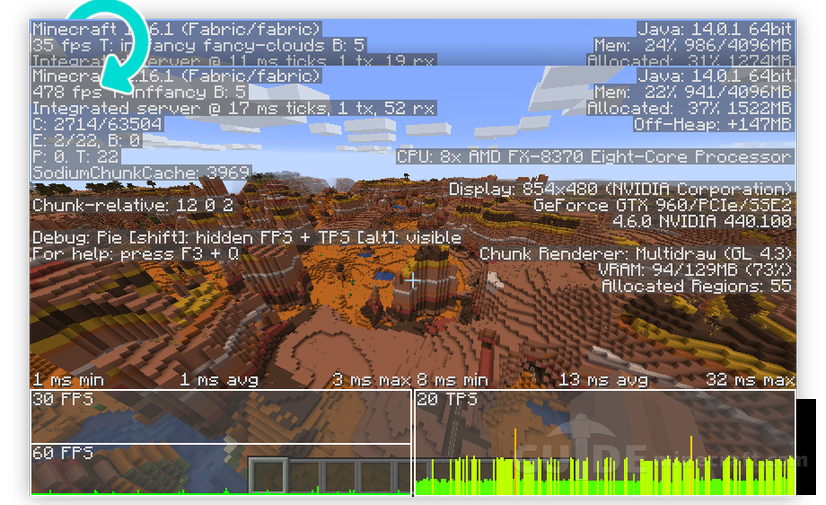
The other visible change is the Video Settings screen. Sodium swaps it for its own menu split into General, Quality, Performance and Advanced pages. That new screen is also how you confirm the mod loaded. The defaults already switch on every optimization your system supports, and CaffeineMC’s advice is to leave them unless something goes wrong. A few options are worth knowing anyway:
- Chunk Update Threads controls how many CPU threads build chunk meshes.
- Use Entity Culling skips drawing mobs and items you cannot see.
- Use Fog Occlusion skips chunks hidden fully behind fog.
- Animate Only Visible Textures stops updating animated textures that are off screen.
Fabric or Quilt setup
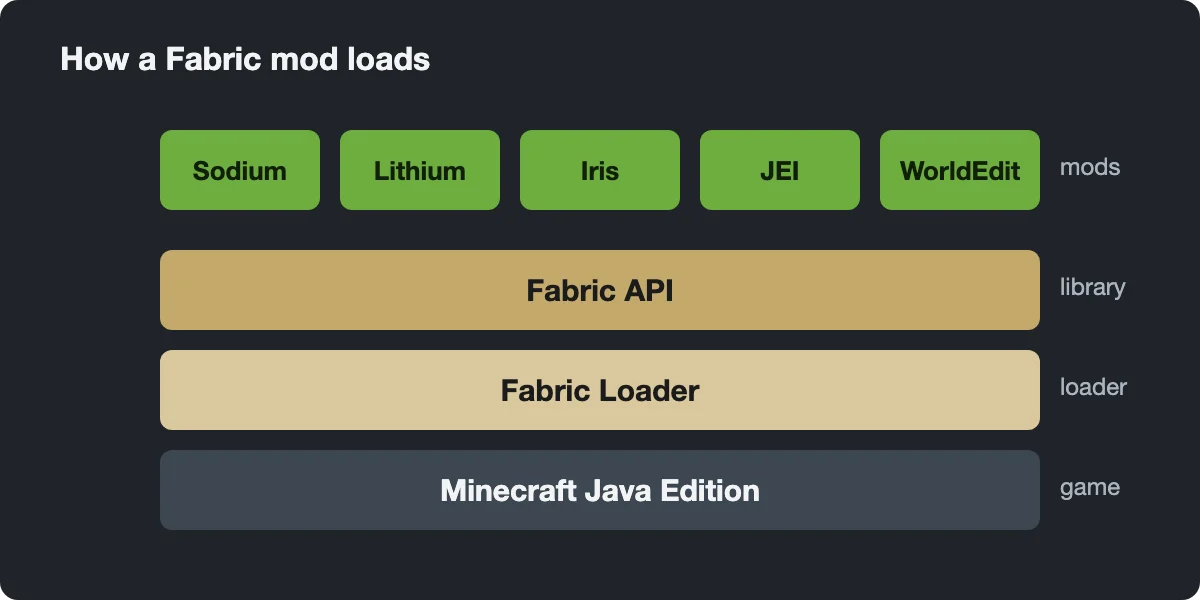
- Install Fabric Loader (or Quilt) for your game version and run it once.
- Download the Sodium file whose name matches that version exactly, then move it into the mods folder.
- Start the Fabric profile and open Video Settings. If the menu has the new page tabs, it worked.
Current Sodium builds bundle the Fabric API modules they need, so Sodium alone doesn’t require Fabric API. Nearly every other Fabric mod does, though, so most setups end up with it anyway. One exception for older files: with Sodium 0.5.x (our 1.20.x and 1.21 files) mods that use the Fabric Rendering API also needed Indium. From 0.6.0 that support is built in. The 1.16.1 jar here is an early test build; the official release list starts at 1.16.3.

Rendering is only one part of the frame
By design, Sodium touches nothing but rendering. Mob AI, redstone, hoppers, block ticks and lighting updates all run on the internal game server, even in singleplayer, and that work never goes through Sodium. CaffeineMC splits the job across mods so you can choose: Lithium speeds up that tick side and is the usual companion, and on versions before 1.19 Phosphor reworked the lighting engine.
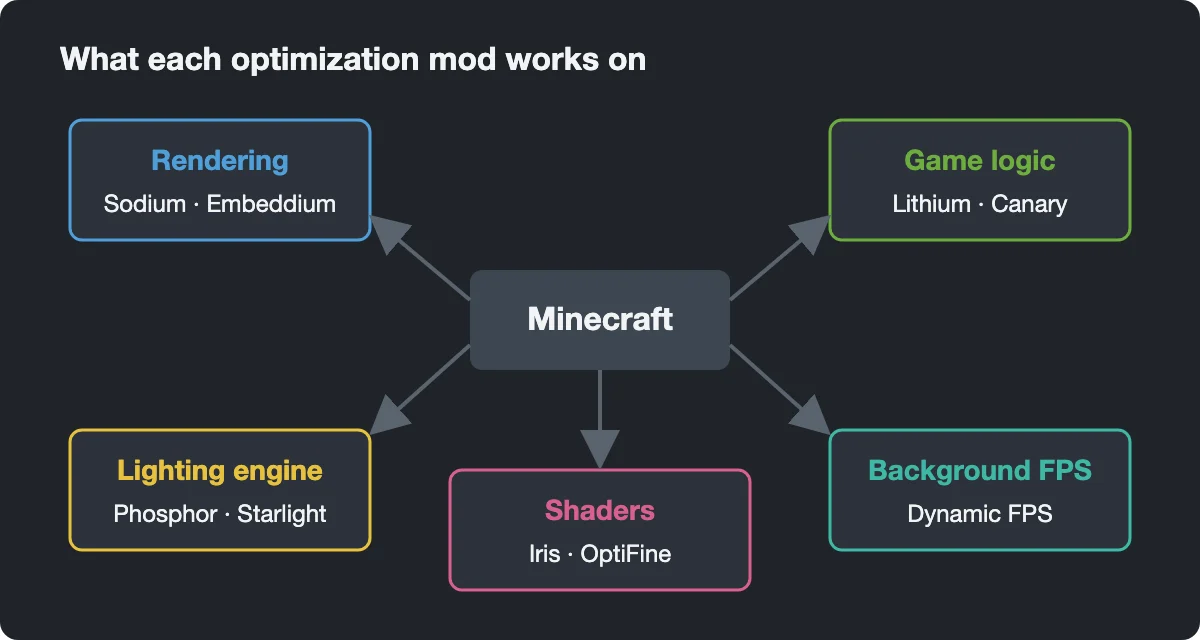
For laptops, Dynamic FPS adds something neither does: it cuts the frame rate while the game sits in the background.
Shaders, OptiFine features and what’s missing
Sodium does not load shaders. For that you add Iris, which requires Sodium and runs the same shader packs that were written for OptiFine. Zoom, connected textures, custom skies and dynamic lights are also not part of Sodium. Each of those comes from a separate small mod if you want it.
Running OptiFine next to Sodium is not an option. Both replace the same code, and Sodium declares itself incompatible with OptiFabric, so Fabric Loader will stop with an error before the game starts. Pick one approach per instance.
Hardware and known conflicts
CaffeineMC officially supports desktop graphics cards with current drivers and OpenGL 4.5: roughly Intel HD Graphics 500 (Skylake), NVIDIA GeForce 400 or AMD Radeon HD 7000 and newer. Older cards that run vanilla often work too, without support. Android launchers and some Windows-on-ARM devices that translate OpenGL through layers like GL4ES or ANGLE are not supported and perform badly.
Two programs cause trouble that looks like a Sodium bug. RivaTuner Statistics Server 7.3.3 and older conflicts with Sodium 0.5 and newer; since 0.5.7 Sodium detects it and stops the game with a crash message, and the fix is to close or uninstall RivaTuner completely. ASUS GPU Tweak III injects itself into Minecraft and causes rendering errors until you add javaw.exe to its blacklist. Outdated graphics drivers remain the most common reason for crashes, so update those first.
The 1.18 download link takes me to a white page with some Russian words and does not download anything
Any 1.16.3 for forge?
is there any sodium for 1.16.2?
Yes, the latest version is working with both 1.16.2 and 1.16.3
Update for 1.16.2?
you put the fabric mod not the forge one