You added a couple of Fabric mods, pressed Play, and instead of the title screen got a list of errors ending in “requires any version of fabric-api, which is missing!”. The fix is this jar. Fabric API is a library made by the FabricMC team that most Fabric mods are built against, and the loader refuses to start them without it. It goes into the mods folder next to them and needs nothing else apart from the Fabric Loader itself.
What the library does, and what it doesn’t
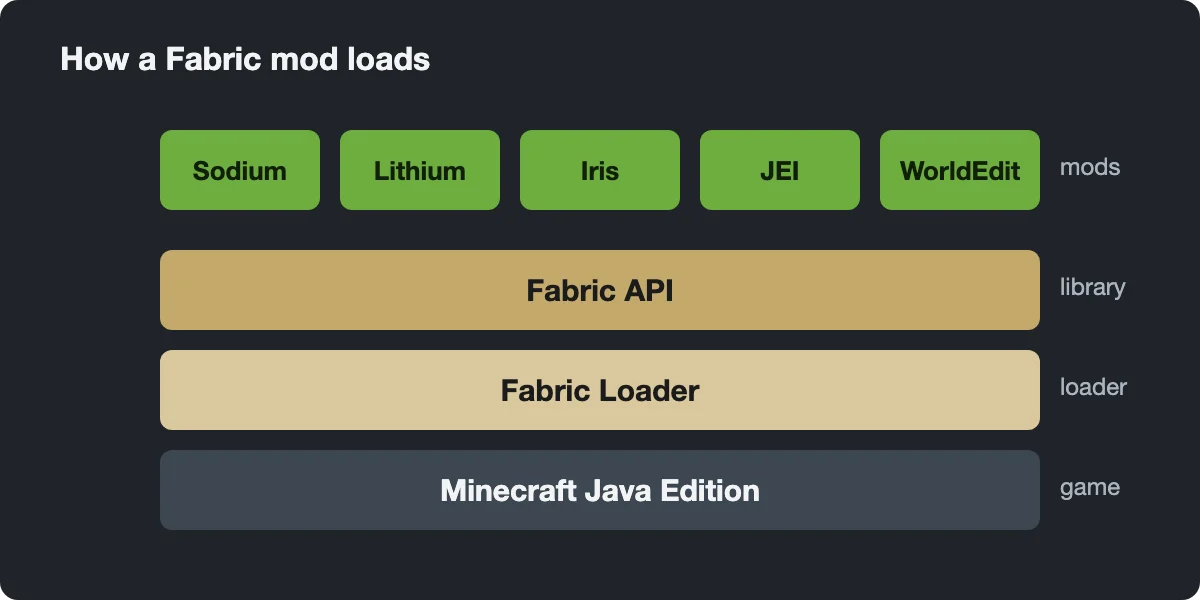
Fabric’s loader is deliberately bare. It finds mods and allows them to modify the game, but offers almost no shared tools. Fabric API fills that gap with a set of modules: events mods can listen to, registry synchronization between client and server, networking helpers, access to biomes, dimensions and particles, extra details in crash reports and a rendering API designed to stay compatible with optimization and graphics mods. Mods call these modules instead of each patching the same spot in the game, which is a big reason Fabric mods tolerate each other well.
It is easy to expect more from it than it gives:
- It is not a loader. Without Fabric Loader installed through the installer, the jar does nothing.
- It adds no blocks, items, settings menus or performance gains.
- It has no in-game mod list. That is what Mod Menu is for, and Mod Menu itself requires Fabric API.
- It does not cover every dependency. Many mods also want other libraries.

Which mods need it
Most do, though not all. On Modrinth’s Fabric 1.21.4 builds, Mod Menu and Dynamic FPS mark Fabric API as required, while Sodium and Lithium list no dependency at all. Recipe viewer REI for 1.21.1 needs three libraries: Fabric API, Architectury API and Cloth Config. Because so many mods depend on it, the simple habit is to install Fabric API every time you set up Fabric, even if your first mod doesn’t ask. An unused copy costs nothing.
Matching the version to your game
Every Fabric API release is tied to one Minecraft version. Official file names show it after the plus sign: in fabric-api-0.119.4+1.21.4.jar, 0.119.4 is the API build and 1.21.4 the game. Choose a build made for your exact version; a 1.21.4 build will not run on 1.21.1. Inside one game version, newer is better, and the API stays compatible with mods written for older builds.
Our list holds one file per game version, usually the first release for it (0.110.5 for 1.21.4, while the newest on Modrinth is 0.119.4). That covers most mods. When a mod wants a newer one, the error names the minimum build, and you only need to replace this one jar. Two entries cover a narrower range than the label suggests: the 1.19.x file is a 1.19.4 build and the 1.18.x file is for 1.18.2. Fabric API also gets snapshot builds, so mods can often be tried on a snapshot before the full release.
On a server with Fabric mods, the same jar goes into the server’s mods folder too.
Fixing “requires fabric-api”
- Open the mods folder of the Fabric installation you launch and look for a fabric-api jar.
- If there is none, add the one for your game version. If there is one, compare its game version with the one in the launcher.
- If the message names a version range, install that build or newer and delete the old jar, so there is only one copy.
- Older loaders word the same problem differently, for example “requires {fabric @ [*]}”. Older Fabric API builds used the mod ID fabric; the fix is identical.
If the crash continues with Fabric API in place, read the rest of the list: another library is missing, or a mod was made for a different game version.
Quilted Fabric API on Quilt
The Quilt loader runs most Fabric mods, and for years Quilt players installed Quilted Fabric API (QFAPI) in place of this jar. QFAPI reimplemented Fabric API on top of Quilt’s own standard libraries, without the internal implementation details some mods relied on, so a few Fabric mods never worked with it. In December 2025 Quilt discontinued those libraries, explaining that keeping pace with Fabric API was not feasible. The last QFAPI release supports 1.21, so on newer versions there is no Quilt equivalent to install.